Diagnostics
Security scan
Go to Diagnostics → Security scan. Enter a domain, or pick one from Your domains, and select Check. To scan again later, select Re-check.
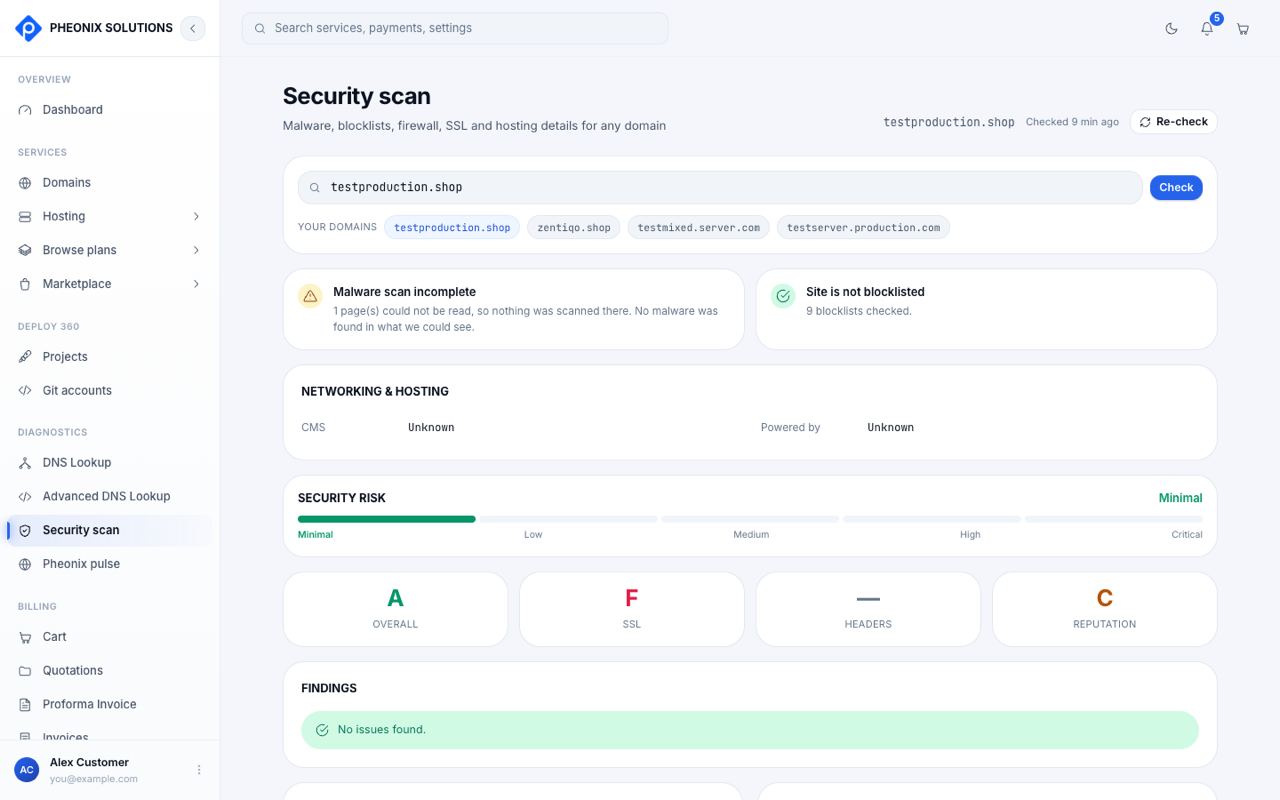
Reading the results
| Section | What it tells you |
|---|---|
| Security risk | An overall level from Minimal to Critical |
| Grades | Letter grades for Overall, SSL, Headers and Reputation |
| Website malware & security | Injected spam, defacements, server errors and malware found on the pages we could read |
| Website blocklist status | Whether the site is listed by Google Safe Browsing, Norton Safe Web, McAfee, Sucuri, ESET, PhishTank, Yandex, Opera or Spamhaus DBL |
| Website firewall | Whether a web application firewall (WAF) protects the site |
| Networking & hosting | The detected CMS and hosting platform |
| Hardening improvements | Concrete suggestions to make the site safer |
| SSL certificate | Whether the certificate is valid, and its details |
| Security headers | Which recommended HTTP security headers the site sends |
note
If the domain doesn't resolve, or the site can't be reached over HTTPS, some checks can't run. The results tell you which ones were skipped.
If something is flagged
- Blocklisted: clean the site first, then request a review from the blocklist provider.
- No firewall detected: a cloud firewall filters attacks and traffic floods before they reach your server.
- Missing security headers or SSL problems: these can usually be fixed in your hosting or web server settings.
Need help? Contact our security team.