Get started
Your dashboard
The dashboard opens every time you sign in. It shows the state of your account at a glance.
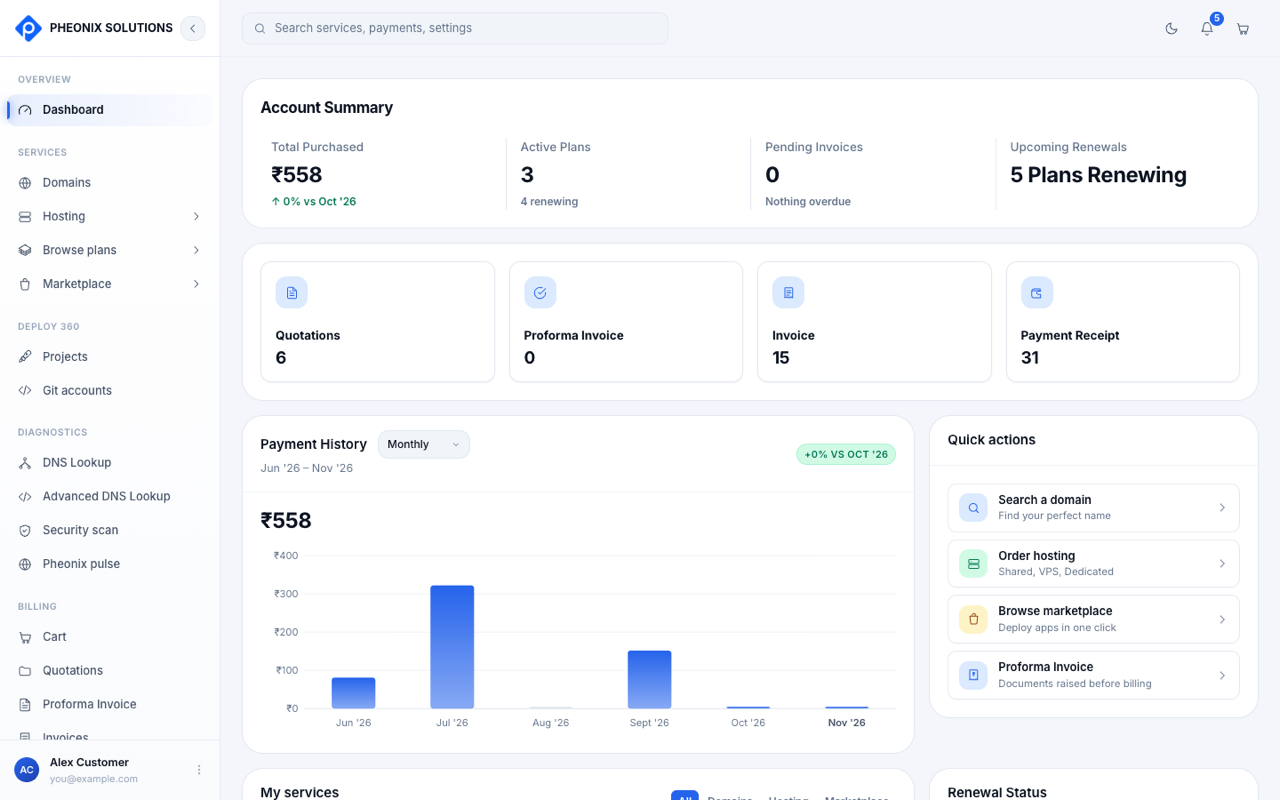
Account summary
| Card | What it shows |
|---|---|
| Total purchased | How much you've spent, compared with the previous month |
| Active plans | How many services are active, and how many of them renew automatically |
| Pending invoices | Invoices that still need paying. "Nothing overdue" means you're up to date. |
| Upcoming renewals | How many plans renew soon |
Below the summary, four counters show how many Quotations, Proforma invoices, Invoices and Payment receipts you have. Select one to open that list.
Payment history
The chart shows what you paid in each period. Use the Monthly menu to change the period. A table below the chart lists the exact amounts.
Quick actions
Shortcuts to the most common tasks:
- Search a domain: find and register a new domain name.
- Order hosting: shared, VPS or dedicated hosting.
- Browse marketplace: launch a one-click app such as WordPress.
- Proforma invoice: see documents raised before billing.
My services
Every service on your account, with its plan, price and expiry date. Filter the list with All, Domains, Hosting or Marketplace.
| Status | Meaning |
|---|---|
| Active | The service is running and paid up |
| Renewal pending | The expiry date has passed and the renewal hasn't been paid yet |
Renewal status
Lists your upcoming renewals and expiries with their dates and prices, so you can plan payments ahead. See Renewals.
The top bar
- Search: find services, payments and settings.
- Moon / sun icon: switch between dark and light mode.
- Bell: notifications. The number shows how many are unread.
- Cart: open your cart.
- Your name (bottom of the left menu): your account menu.